


-
Rotating each of the selected objects relative to the Z-axis with the center of rotation relative to itself
Call options
- ModPlus floating menu or palette
- Menu, toolbar, or ribbon in nanoCAD
- Command line: _mncMultiRotate
Icon


Using
Each selected entity will be rotated relative to the Z-axis with the center at a specified point - Left Bottom, Right Bottom, Left Top, Right Top or Center. The center of rotation is determined by the rectangle that describes the entity (Bounding Box).
Select objects [Copy]: – selecting objects.
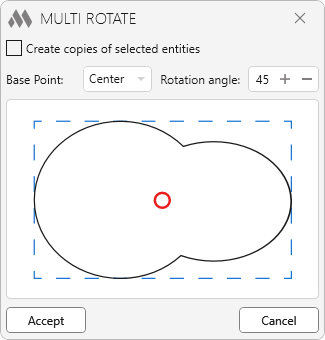
Create copies of selected entities – when this option is enabled, copies of the selected entities will be rotated
Base Point: – selecting the center of rotation point in the drop-down list (displayed in red on the scheme), 9 positions are available
Rotation angle: – enter the angle of rotation value in degrees. The number must be in the range from 1 to 359.
-