Setting sheet numbers in the document and volume in ModPlus formats and title blocks
Call options
- ModPlus floating menu or palette
- Menu, toolbar, or ribbon in nanoCAD
- Command line: _mncSheetNumbers
Icon
Using
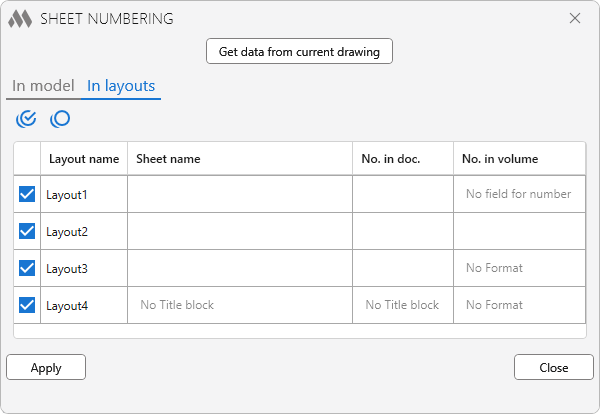
Plugin allows you to change the name and number of the sheet (values in the stamp) and the number of the sheet in the volume (the field in the upper right corner of the format).
Get data from current drawing – reading data from the current drawing, depending on the selected tab – in the model or in layouts. To search in model, you must first go to the model.
Data retrieval occurs by formats and stamps created by the ModPlus plugin. Depending on the presence of a format and/or a stamp in the list, the fields for indicating the name of the sheet, the number in the document and the number in the volume become active.
 – check all the sheets in the list.
 – uncheck all the sheets in the list.
Apply – all values for sheets marked in the list will be recorded in stamps and formats. For formats, the number in the volume is added as a block attribute.
Close – close the window without applying changes.


