


-
Calculating the count and total area of selected polylines, circles, arcs, splines, and hatches
Call options
- ModPlus floating menu or palette
- Menu, toolbar, or ribbon in nanoCAD
- Command line: _mncSumArea
Icon


USING
The plugin gets the sum of areas of selected polylines, circles, arcs, splines and hatches. Objects can be selected both before the plugin is started and when the plugin window is open. Calculation results will be displayed in the plugin window:
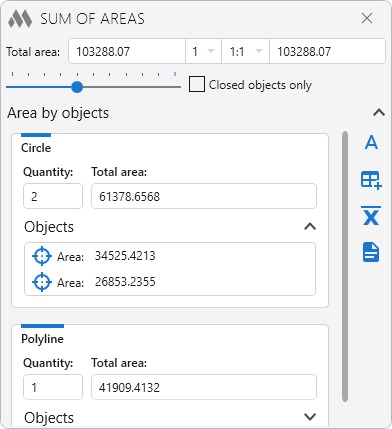
The upper part of the plugin window displays the total sum of the selected objects, the result multiplier, the scale, the total sum taking into account multiplier and scale. When applying scale to area, it is important to recognise that area decreases in proportion to the square of the change in scale, not linearly. For example, if at a scale of 1:1 the area is 100, then at a scale of 1:2 it will be 25, not 50.
Closed objects only – if this option is enabled, the plugin will process only objects that form a closed contour.
 – insert result as single line text:
Insertion point: – specifying a single line text insertion point
 – insert result into table cell:
Select table: – table selection
Select row: – select cell to insert result
 – output arithmetic mean (including rounding results) for each object type and for all selected objects to a txt-file.
 – export result to txt-file.
Entities – list of selected objects.
 – zooming the current entity in full screen.
 -