


Revit. Room Finishing. Parameter Filling, Finish Management, and other new features
We are pleased to present the update of the Room Finishing plugin, version 3.0!
In this version:
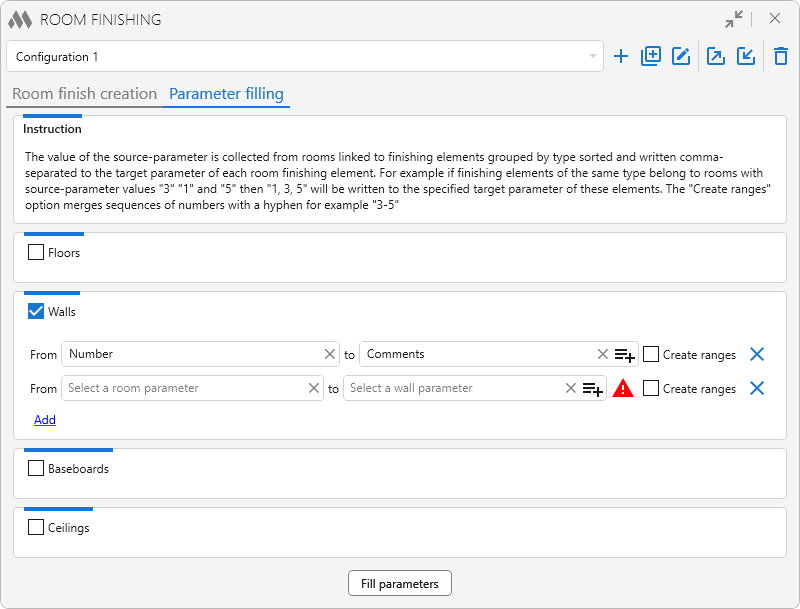
A new Parameter filling tab has been added. It allows you to group and transfer parameter values from multiple rooms to their associated finishing elements. This is especially useful for generating a summary list of room numbers in a schedule: a single type of finishing element can be used in several rooms at once, and the values from all such rooms will be automatically collected into the element's parameter.
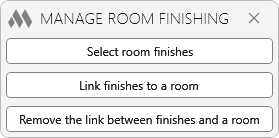
A new Manage Room finishing command has been added. It allows you to select finishing elements associated with a room, as well as add and remove the link between a room and finishing elements. This makes it possible to link finishing elements that were not created by the plugin to a room, and then transfer parameter values from the room to those elements.
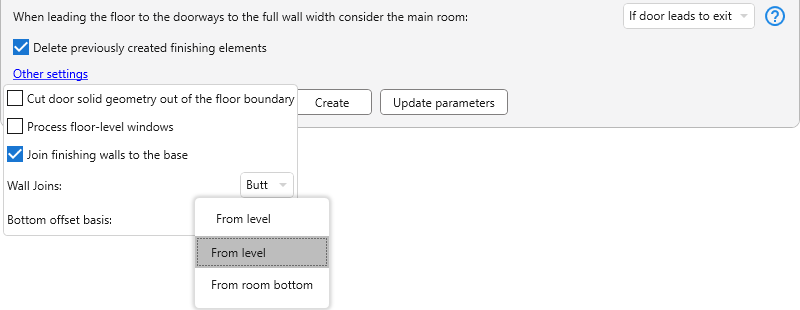
An option has been added to select the bottom offset basis - from the level or from the room bottom. You can now choose a mode where the bottom offset is calculated from the room bottom rather than from the level elevation. This is convenient in cases where rooms on the same plan have different bottom elevations.
Several bugs that caused incorrect creation of finishing elements have been fixed.
We hope that the new version of the plugin will make room finishing even more convenient and efficient! And don't forget to send us your suggestions!
Enjoy working with ModPlus!