


Revit. Dimensions on plan 4.0. New "Reinforcement" tab, processing elements from links and other improvements
We are glad to present the update of the Dimensions on plan plugin, version 4.0!
In this article we will briefly tell you about the new features and improvements:
Licensing
We have changed the limitation principle of the paid version of the plugin. Previously, an advertising window was displayed after using the plugin. Now there will be a one-month trial period, after which the plugin will become unavailable if there is no license.
"Reinforcement" tab
A new Reinforcement tab has been added, where we plan to add options for dimensioning reinforcement on plans. At the moment we have added the Reinforcement zones option:
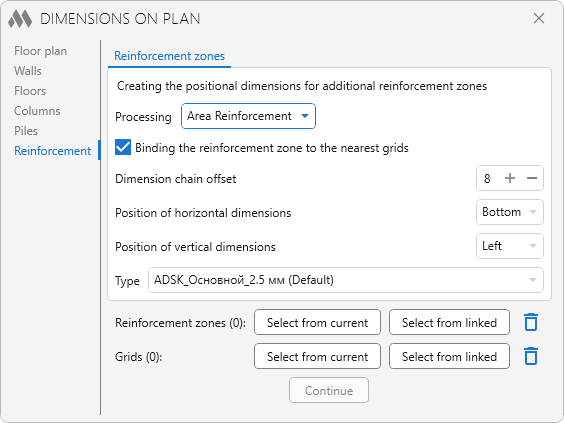
We will add other options based on your feedback!
Processing elements from links and selecting the dimension type
Now buttons for selecting elements are available on all tabs – from the current model or from a linked one:
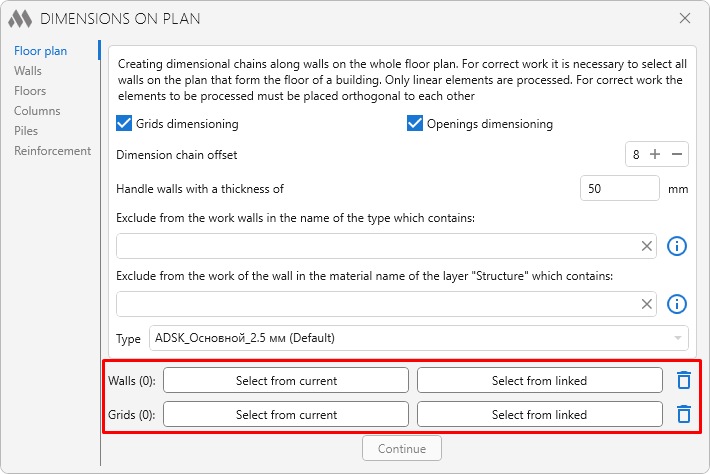
First you select all the required elements, and then you start the dimension creation process by clicking the Continue button.
Also, the selection of the type for the created dimensions is now available on all tabs.
"Walls" tab
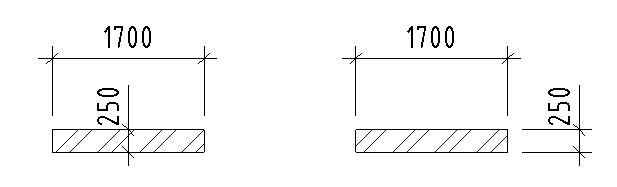
The transverse dimension of a wall can now be placed not only at the center of the wall, but also at the wall end:
The Consider view range option has been added, which allows you to ignore walls located below the view cut plane.
The Only non integer dimension values option has been added, which will allow you to check the correctness of wall bindings.
"Columns" tab
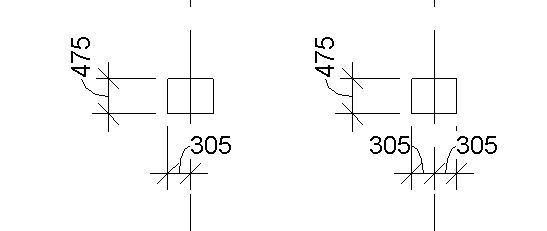
Now you can specify the number of dimensions for cases when a grid line crosses a column – two dimensions or one:
"Floors" tab
The logic of creating dimensions by openings has been changed – now the dimension will be placed not on the floor face, but on the face of the family that formed the opening in the floor.
Write to us your ideas for automating annotation on plans, and we will definitely take them into account!
Enjoy your work with ModPlus!